> ## Documentation Index
> Fetch the complete documentation index at: https://docs.perfai.ai/llms.txt
> Use this file to discover all available pages before exploring further.
# Quickstart
> Paste your app URL. Perfai does the rest — autonomous security testing in about 20 minutes.
## All you need is a URL
No code access. No configuration. No browser plugins. Paste your app URL and Perfai's agents handle everything — account creation, role discovery, app mapping, and security testing — completely on their own.
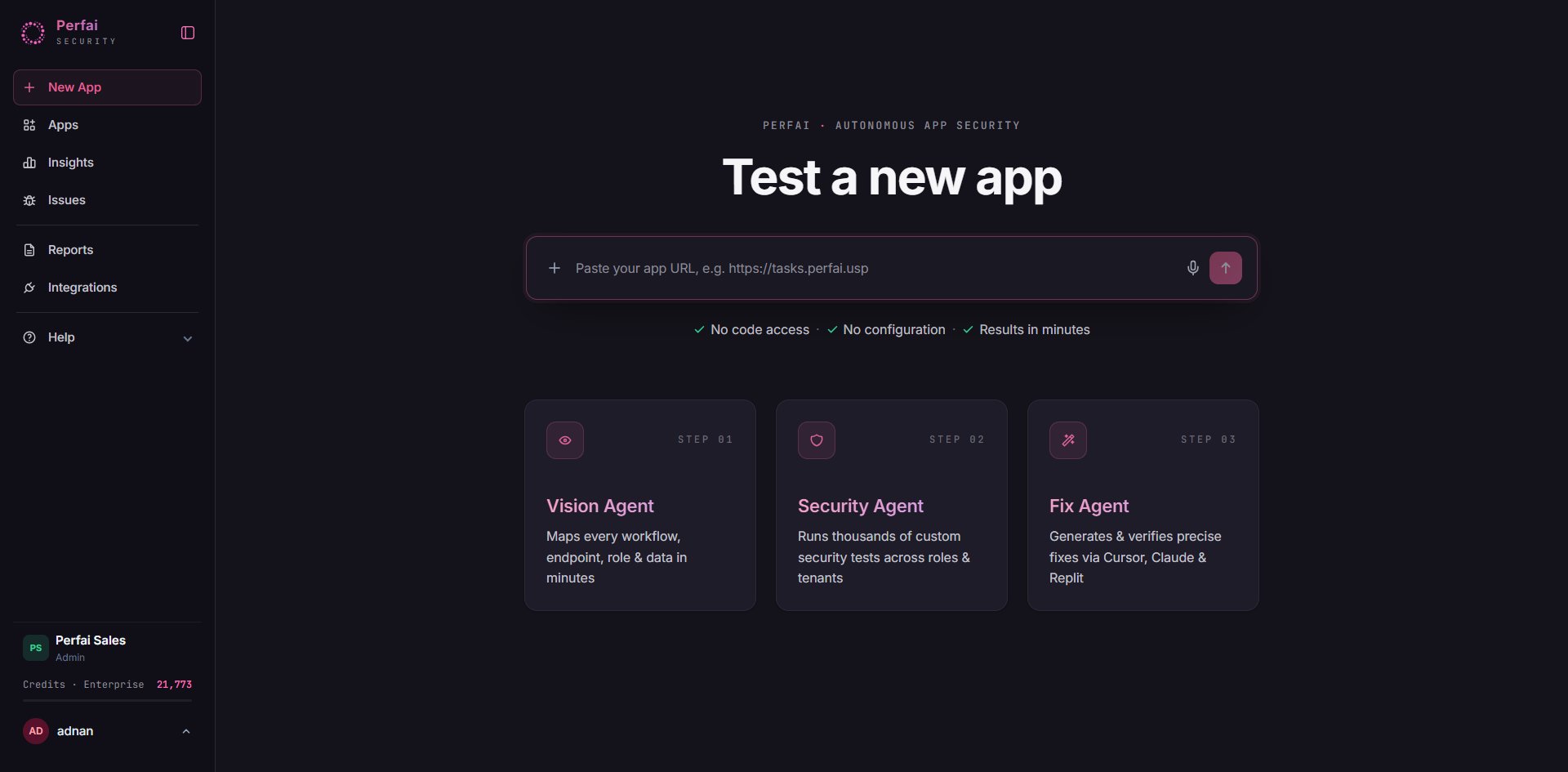 Hit the arrow button and three agents run in sequence:
Maps every workflow, API, role & data in minutes.
Runs thousands of custom security tests across roles & tenants.
Generates & verifies precise fixes via Cursor, Claude & Replit.
***
## What happens step by step
After you paste your URL, Perfai shows a **New app setup** confirmation with the four tasks it will run automatically:
Hit the arrow button and three agents run in sequence:
Maps every workflow, API, role & data in minutes.
Runs thousands of custom security tests across roles & tenants.
Generates & verifies precise fixes via Cursor, Claude & Replit.
***
## What happens step by step
After you paste your URL, Perfai shows a **New app setup** confirmation with the four tasks it will run automatically:
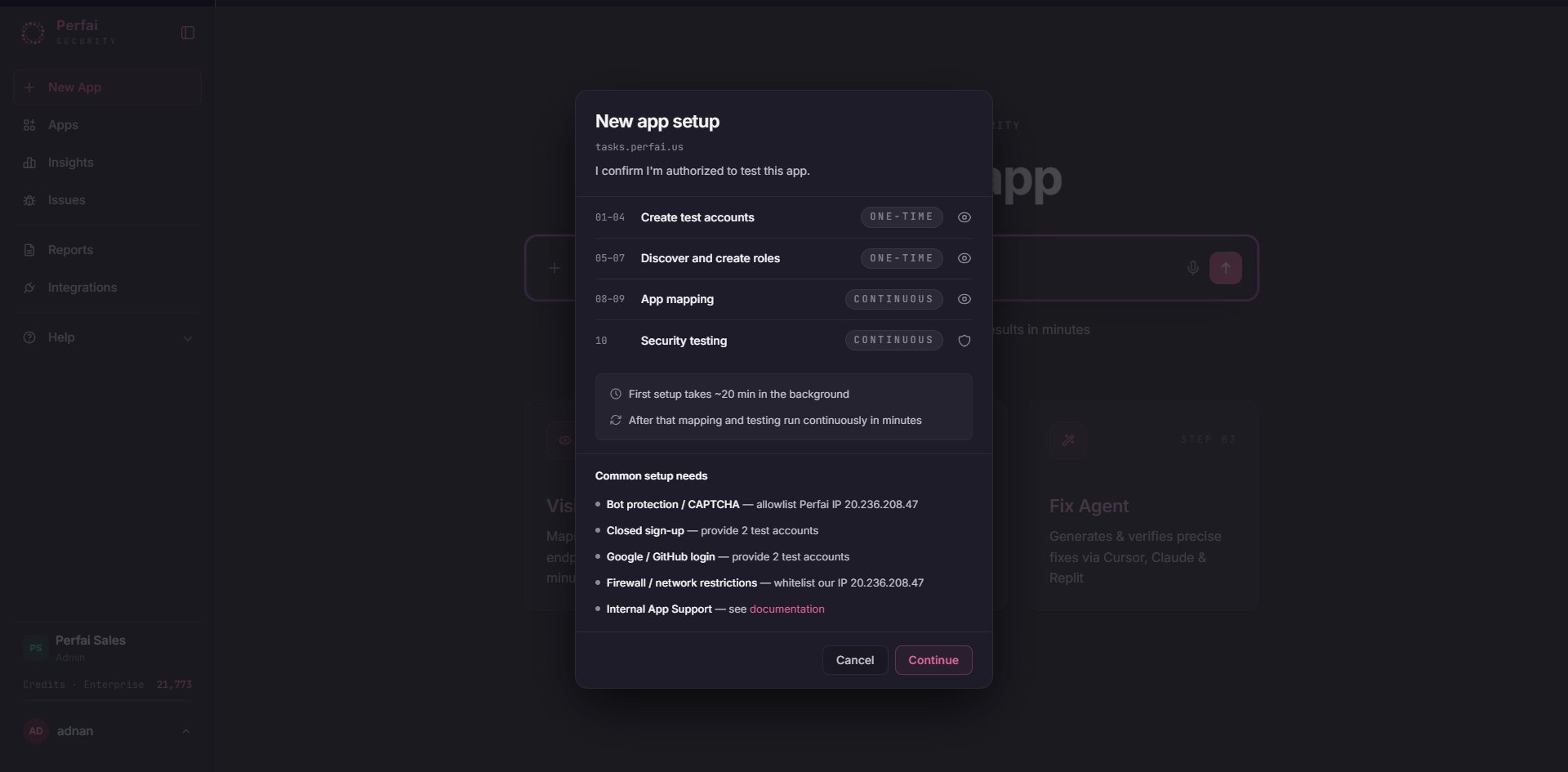 | # | Task | Type |
| - | ----------------------- | ---------- |
| 1 | Create Test Accounts | One-time |
| 2 | Discover & Create Roles | One-time |
| 3 | App Mapping | Continuous |
| 4 | Security Testing | Continuous |
Click **Continue**. You don't need to configure anything else.
**One-time** tasks run once to bootstrap your test environment. **Continuous** tasks re-run automatically on every future scheduled scan as your app evolves.
The **Vision** tab opens showing the full agent execution plan. Each node in the graph is a task the Vision Agent will complete — in order — before handing off to the Security Agent.
| # | Task | Type |
| - | ----------------------- | ---------- |
| 1 | Create Test Accounts | One-time |
| 2 | Discover & Create Roles | One-time |
| 3 | App Mapping | Continuous |
| 4 | Security Testing | Continuous |
Click **Continue**. You don't need to configure anything else.
**One-time** tasks run once to bootstrap your test environment. **Continuous** tasks re-run automatically on every future scheduled scan as your app evolves.
The **Vision** tab opens showing the full agent execution plan. Each node in the graph is a task the Vision Agent will complete — in order — before handing off to the Security Agent.
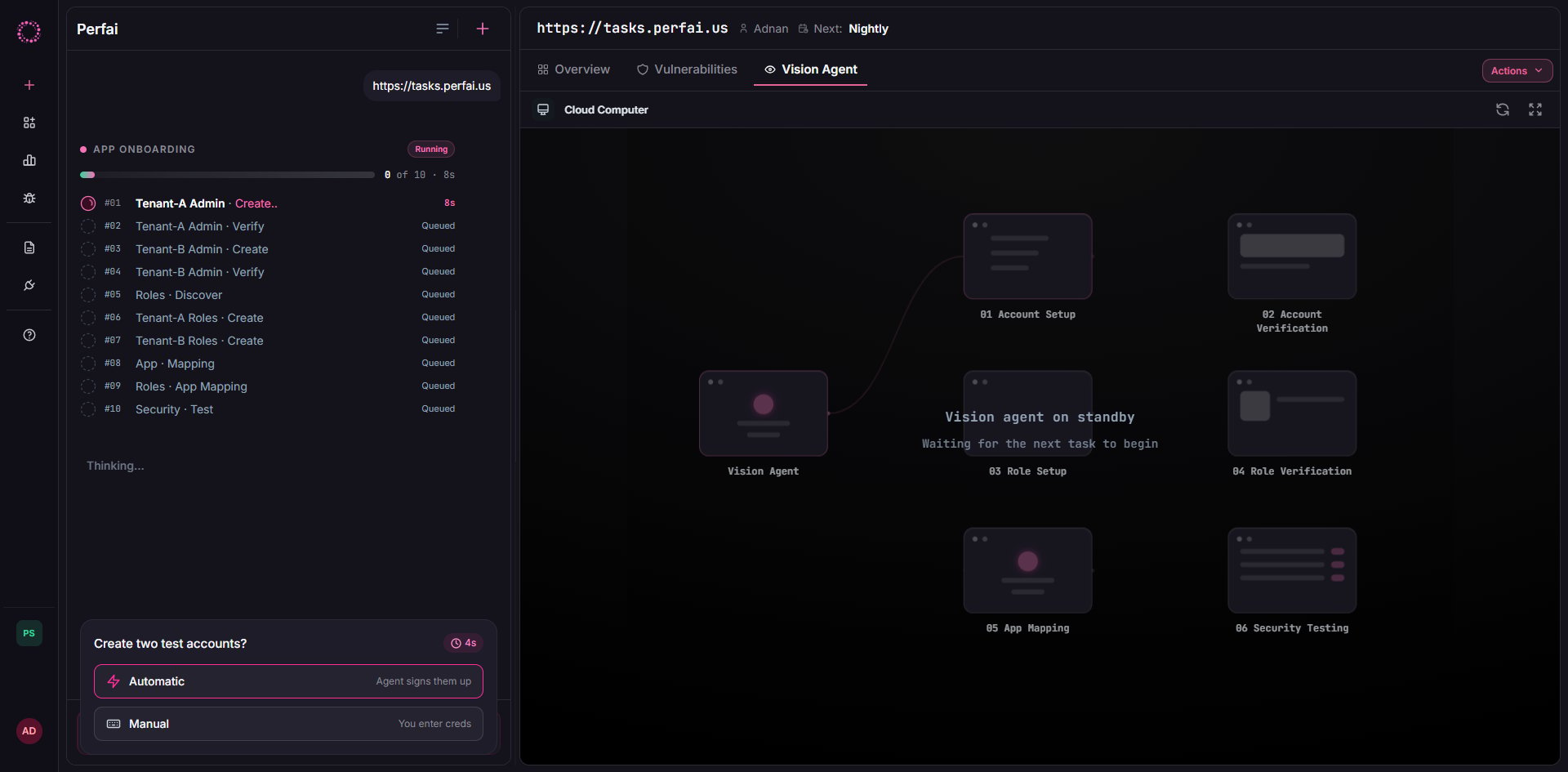 The right panel renders the live task graph:
```
Vision Agent
├──▶ Account creation ──▶ Account verification
├──▶ RBAC Account Creation ──▶ RBAC Account Verification
├──▶ Attack surface mapping
└──▶ Security Testing
```
The left panel logs every action in real time:
```
Creating Account 1...
Waiting for task to be picked up by Vision...
Starting: Creating Account 1...
```
The agent asks one question first: would you like it to auto-sign up accounts using your app URL? Answer **Yes** for fully automated account creation, provide credentials manually, or skip and add them later. **Yes** is the right answer for most apps.
With test accounts created and roles confirmed, the Vision Agent takes control of a cloud browser and explores your entire app — clicking through every screen, submitting forms, and recording every API call made along the way.
The right panel renders the live task graph:
```
Vision Agent
├──▶ Account creation ──▶ Account verification
├──▶ RBAC Account Creation ──▶ RBAC Account Verification
├──▶ Attack surface mapping
└──▶ Security Testing
```
The left panel logs every action in real time:
```
Creating Account 1...
Waiting for task to be picked up by Vision...
Starting: Creating Account 1...
```
The agent asks one question first: would you like it to auto-sign up accounts using your app URL? Answer **Yes** for fully automated account creation, provide credentials manually, or skip and add them later. **Yes** is the right answer for most apps.
With test accounts created and roles confirmed, the Vision Agent takes control of a cloud browser and explores your entire app — clicking through every screen, submitting forms, and recording every API call made along the way.
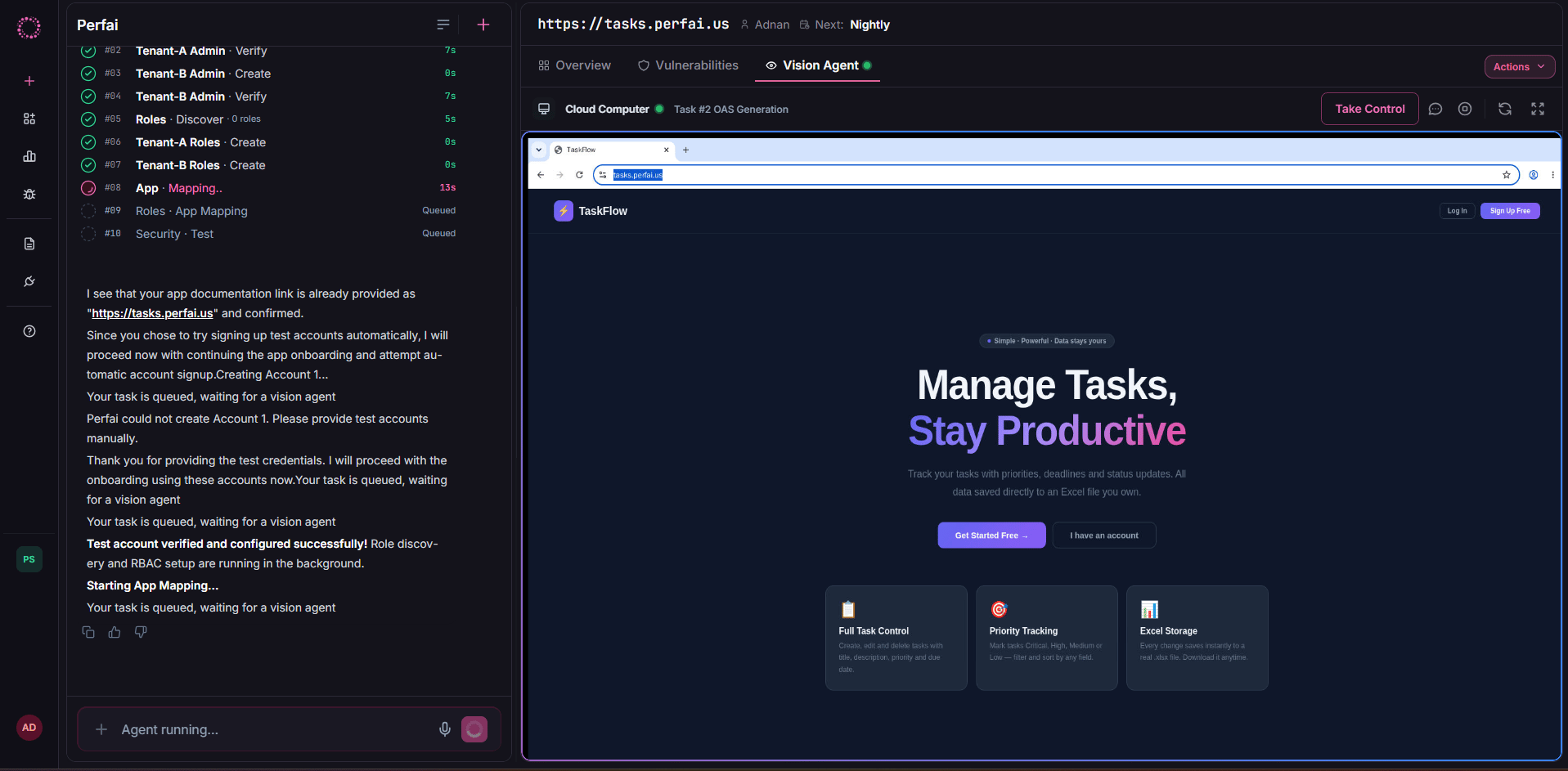 Watch the live browser stream as it autonomously navigates your app in real time. The left panel tracks every step:
```
App mapping has started. This process may take up to 10 minutes.
Step 3: Attack Surface Mapping
→ Enter a phone number in the Phone field and click Save...
```
The result is a complete attack surface map — every UI workflow, API endpoint, role permission, and sensitive data type documented automatically.
When mapping completes, the Security Agent immediately begins running permission tests across all discovered endpoints. No trigger needed.
```
Analyzing Attack Surface Map
Triggering security test runs...
Your app is now being tested. Security runs have been triggered.
```
When done, switch to the **Overview** tab to see your full results:
Watch the live browser stream as it autonomously navigates your app in real time. The left panel tracks every step:
```
App mapping has started. This process may take up to 10 minutes.
Step 3: Attack Surface Mapping
→ Enter a phone number in the Phone field and click Save...
```
The result is a complete attack surface map — every UI workflow, API endpoint, role permission, and sensitive data type documented automatically.
When mapping completes, the Security Agent immediately begins running permission tests across all discovered endpoints. No trigger needed.
```
Analyzing Attack Surface Map
Triggering security test runs...
Your app is now being tested. Security runs have been triggered.
```
When done, switch to the **Overview** tab to see your full results:
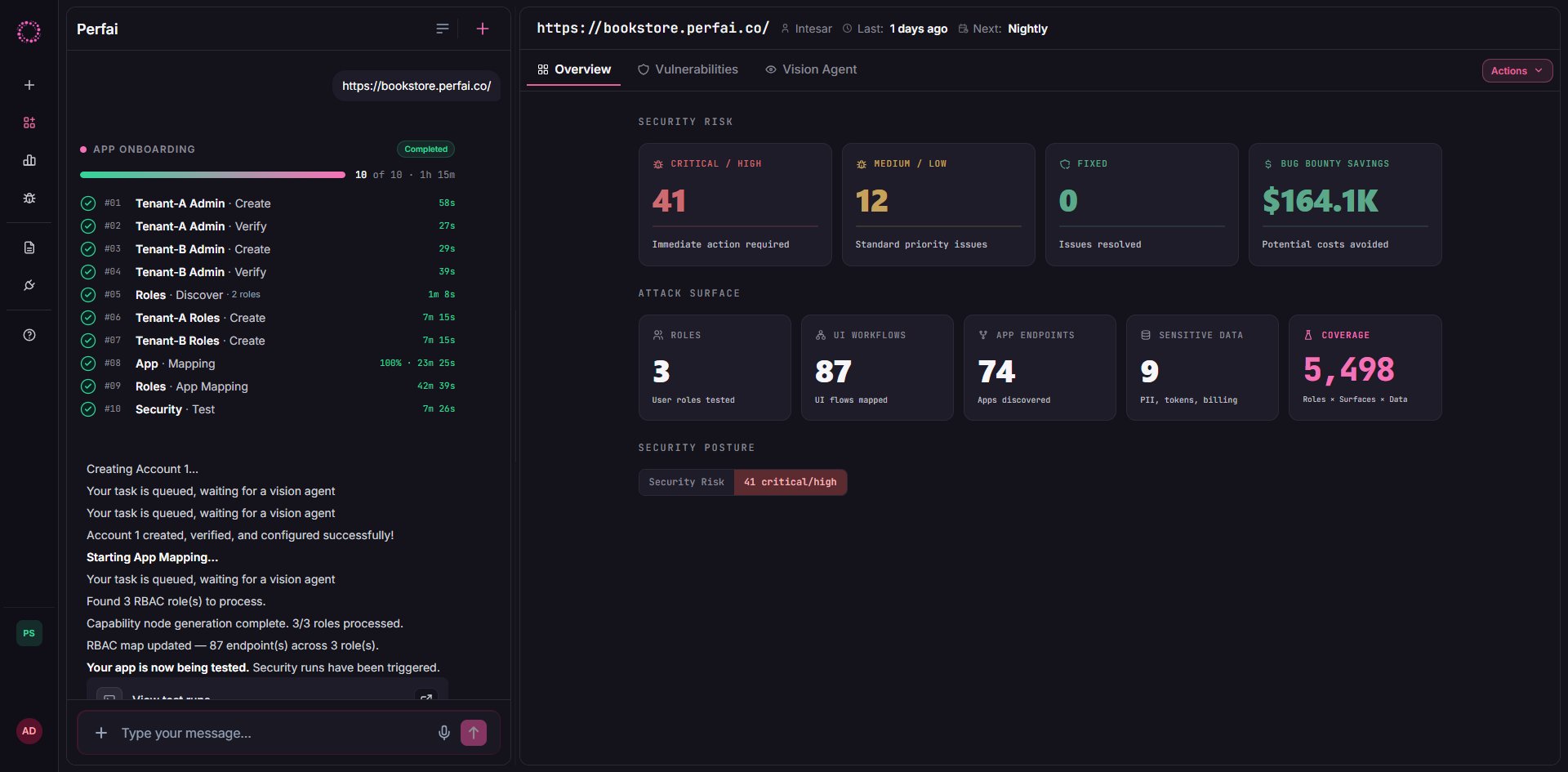 **Security Risk** shows confirmed findings:
| | | |
| ---------------------- | -- | -------------------------------------------- |
| 🔴 **Critical / High** | 15 | Immediate action required |
| 🟡 **Medium / Low** | 2 | Standard priority issues |
| 🟢 **Fixed** | 0 | Issues resolved (grows as you fix & re-scan) |
**Attack Surface** shows what was covered:
| | |
| -------------- | -------------------- |
| Workflows | 24 UI flows mapped |
| Endpoints | 13 APIs discovered |
| Roles | 1 user role tested |
| Sensitive data | 7 data types exposed |
| Security tests | 703 test cases run |
Click any finding to see the affected endpoint, attacking role, expected vs. actual response, and a reproduction step you can run immediately. Click **Actions → Generate Reports** to export your full security report.
Switch from **Overview** to the **Security** tab for the full issues list — every confirmed vulnerability for this specific app, sorted by severity.
**Security Risk** shows confirmed findings:
| | | |
| ---------------------- | -- | -------------------------------------------- |
| 🔴 **Critical / High** | 15 | Immediate action required |
| 🟡 **Medium / Low** | 2 | Standard priority issues |
| 🟢 **Fixed** | 0 | Issues resolved (grows as you fix & re-scan) |
**Attack Surface** shows what was covered:
| | |
| -------------- | -------------------- |
| Workflows | 24 UI flows mapped |
| Endpoints | 13 APIs discovered |
| Roles | 1 user role tested |
| Sensitive data | 7 data types exposed |
| Security tests | 703 test cases run |
Click any finding to see the affected endpoint, attacking role, expected vs. actual response, and a reproduction step you can run immediately. Click **Actions → Generate Reports** to export your full security report.
Switch from **Overview** to the **Security** tab for the full issues list — every confirmed vulnerability for this specific app, sorted by severity.
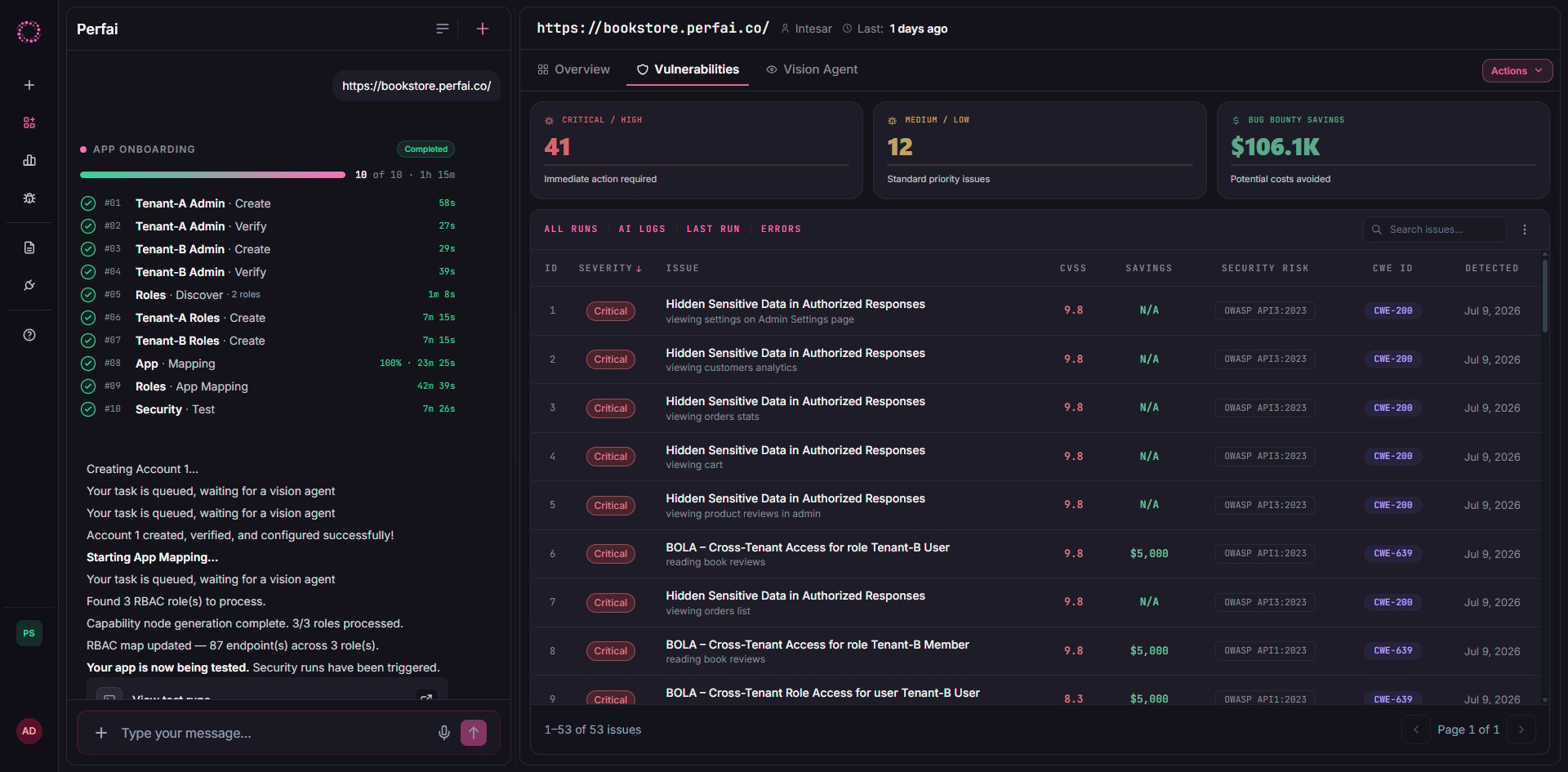 The three headline cards summarize your exposure for this app:
| | |
| ------------------------- | ---------------------------------------------------- |
| 🔴 **Critical / High** | 49 — immediate action required |
| 🟡 **Medium / Low** | 17 — standard priority |
| 💚 **Bug Bounty Savings** | \$240K — potential costs avoided if found externally |
The issues table shows **66 total findings** with full detail per row:
| Column | What it means |
| ----------------- | ------------------------------------------------------------------------------------------------------------------------------------------- |
| **Issue** | Vulnerability name, affected role, and the specific action being exploited (e.g., *BOLA – Cross-Tenant Access for role Ui-Auth-T2 - Admin*) |
| **Security Risk** | The OWASP API standard the issue maps to (e.g., `OWASP API1:2023`) |
| **CVSS** | Severity score 0–10. All BOLA findings here score 9.8 — maximum urgency |
| **CWE ID** | Common Weakness Enumeration ID for precise categorization (e.g., `CWE-20`) |
| **Savings** | Estimated bug bounty value if a researcher had found this instead (e.g., `$5,000` per finding) |
| **Severity** | Critical / High / Medium / Low badge |
| **Since / Last** | When the issue was first found and most recently confirmed |
Use the **All Runs / Coverage / AI Logs / Last Run / Errors** tabs to dig deeper into test coverage, the agent's reasoning, and any test execution errors.
The Security tab is scoped to one app. The global [Issues](/docs/core-concepts/issues) page aggregates findings across your entire portfolio — useful for org-wide risk reviews and compliance reporting.
***
## Runs automatically from here
Once registered, Perfai keeps testing your app on a continuous schedule — visible at the top of every app dashboard (`Next: Nightly`). No manual trigger needed.
| Task | Frequency |
| ---------------- | ----------------------------------------- |
| App mapping | Continuous — re-maps as your app changes |
| Security testing | Continuous — re-tests the updated surface |
| Full scan | Nightly by default |
***
## Next Steps
Understand how Perfai models apps, workflows, roles, and issues.
Learn how findings are classified, prioritized, and tracked to resolution.
The three headline cards summarize your exposure for this app:
| | |
| ------------------------- | ---------------------------------------------------- |
| 🔴 **Critical / High** | 49 — immediate action required |
| 🟡 **Medium / Low** | 17 — standard priority |
| 💚 **Bug Bounty Savings** | \$240K — potential costs avoided if found externally |
The issues table shows **66 total findings** with full detail per row:
| Column | What it means |
| ----------------- | ------------------------------------------------------------------------------------------------------------------------------------------- |
| **Issue** | Vulnerability name, affected role, and the specific action being exploited (e.g., *BOLA – Cross-Tenant Access for role Ui-Auth-T2 - Admin*) |
| **Security Risk** | The OWASP API standard the issue maps to (e.g., `OWASP API1:2023`) |
| **CVSS** | Severity score 0–10. All BOLA findings here score 9.8 — maximum urgency |
| **CWE ID** | Common Weakness Enumeration ID for precise categorization (e.g., `CWE-20`) |
| **Savings** | Estimated bug bounty value if a researcher had found this instead (e.g., `$5,000` per finding) |
| **Severity** | Critical / High / Medium / Low badge |
| **Since / Last** | When the issue was first found and most recently confirmed |
Use the **All Runs / Coverage / AI Logs / Last Run / Errors** tabs to dig deeper into test coverage, the agent's reasoning, and any test execution errors.
The Security tab is scoped to one app. The global [Issues](/docs/core-concepts/issues) page aggregates findings across your entire portfolio — useful for org-wide risk reviews and compliance reporting.
***
## Runs automatically from here
Once registered, Perfai keeps testing your app on a continuous schedule — visible at the top of every app dashboard (`Next: Nightly`). No manual trigger needed.
| Task | Frequency |
| ---------------- | ----------------------------------------- |
| App mapping | Continuous — re-maps as your app changes |
| Security testing | Continuous — re-tests the updated surface |
| Full scan | Nightly by default |
***
## Next Steps
Understand how Perfai models apps, workflows, roles, and issues.
Learn how findings are classified, prioritized, and tracked to resolution.