

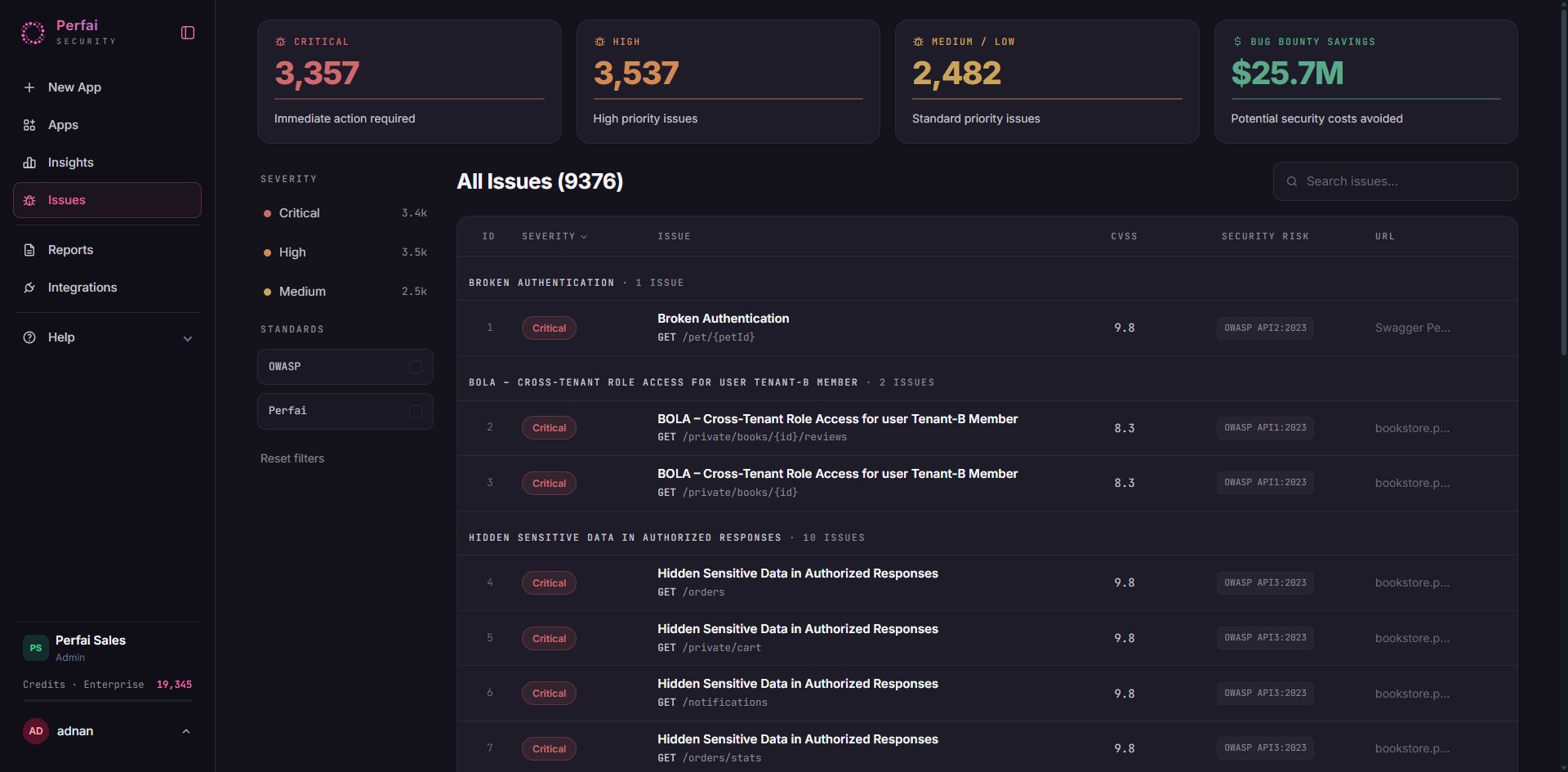
What is the Issues page?
Issues is where every confirmed security vulnerability lives. Every finding Perfai surfaces — across all your apps — is collected here, severity-ranked, and mapped to industry standards like OWASP API Security Top 10. This is the page your security engineers and developers live in. It’s where you triage findings, assign fixes, track remediation progress, and understand exactly what’s exposed in your apps right now.The headline numbers
Four metrics at the top give you the current state of your vulnerability backlog:3,207 Critical
Confirmed bypasses requiring immediate action — broken authentication, BOLA, privilege escalation with high CVSS scores (9.0+). These are real, reproducible, and actively exploitable.
2,287 High
High-priority issues with clear exploitation paths. CVSS scores typically 7.0–8.9. Should be in your sprint within days of discovery.
2,766 Medium / Low
Standard priority — real findings with lower immediate impact. Important to address but not at the expense of critical/high work.
$23.1M Bug Bounty Savings
Total estimated value of all issues found internally. Every critical finding you fix before a researcher submits it saves real money.
The issue list
The main table shows All Issues (8,260) grouped by vulnerability category, ordered by severity:
Issues are grouped by category — for example, all Broken Authentication findings across different endpoints appear together. This makes it easy to spot systemic problems: 7 endpoints sharing the same auth failure is almost always a middleware issue, not 7 separate bugs.
Vulnerability categories
Broken Authentication
Endpoints accessible without a valid session. CVSS 9.8 — the highest severity class. Often affects
/private/ routes where auth middleware was missed.Example: GET /private/books/new-releases returns data without any token.BOLA — Cross-Tenant Role Access
Broken Object Level Authorization. User A accesses User B’s objects by substituting an ID. CVSS 8.3. The most common critical finding in multi-tenant apps.Example:
GET /users/{id}/reviews returns another user’s private reviews.Privilege Escalation
A lower-privileged role calls endpoints reserved for higher roles — admin functions accessible to standard users.
Mass Assignment
Request bodies accept fields that shouldn’t be writable — like
is_admin: true — letting users modify their own permissions.Broken Function Level Auth
Batch operations, exports, or admin functions callable by roles that should be excluded, even if individual object access is controlled.
Sensitive Data Exposure
Responses include more data than the requesting role should see — internal IDs, other users’ fields, system metadata.
Filtering issues
Use the left sidebar to narrow your focus: By Severity:- Critical (3.2k)
- High (2.3k)
- Medium (2.8k)
- OWASP API2:2023 — issues mapped to the OWASP API Security Top 10
- Perfai — issues found by Perfai’s proprietary detection rules beyond standard frameworks
Understanding CVSS scores
Every issue carries a CVSS score so findings are ranked objectively:
Two Critical findings aren’t equal — a 9.8 (unauthenticated access) is more urgent than a 9.1. Always sort by CVSS within a severity band.
Acting on issues
1
Start with Critical, highest CVSS first
Sort by Severity → Critical, then CVSS descending. A CVSS 9.8 Broken Authentication means data is accessible right now without any credentials.
2
Look for patterns in grouped categories
If a category shows 7+ issues, it’s almost certainly systemic — a missing middleware or an incorrect auth check at the service level. Fix the root cause, not each endpoint individually.
3
Click through for reproduction steps
Every issue links to full details: the exact endpoint, the role used, the request made, the response received, and a
curl command to reproduce it. Verify the finding before assigning.4
Fix and let Perfai re-verify
Once a fix is deployed, Perfai re-tests the endpoint on the next scan. If the bypass no longer works, the issue moves to Fixed automatically — no manual update needed.
Per-app Security tab vs. the global Issues page
There are two places to see findings in Perfai — and they serve different purposes:
The per-app Security tab also shows how each finding maps to a specific role. For example, a BOLA finding is reported once per role that can exploit it —
Ui-Auth-T2 - Admin, Ui-Auth-T2 - Member, Ui-Auth-T2 - User — giving you the exact blast radius per role rather than a single collapsed finding.